Saturday, March 23, 2013

Eclipse Maven Build Fail - use -source 5 or higher to enable annotations

When you are using Maven package option in eclipse for generating a war file of a java web project which has the annotation in it,you will encounter the Build Fail error, below is the sample error which you will encounter, if the JRE and Annotation compiler wasn't configured properly in Eclipse
FAILED for project: 
    ExpenseReporting:ExpenseReporting:war:0.0.1-SNAPSHOT
Reason:
C:\Documents and Settings\MRamanujam\workspace\ExpenseReporting\src\main\java\com\expense\domain\Base.java:[9,2] annotations are not supported in -source 1.3
(use -source 5 or higher to enable annotations)
 @Id
To resolve the issue first you need to make sure that, Java compiler version you are using is greater than 5

javac -version

Next go to your project properties, select the Java Compiler in the tree menu.
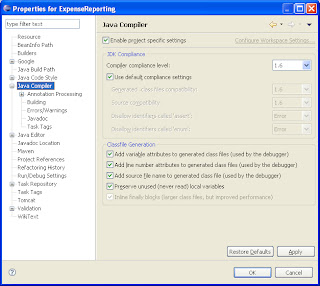
Make sure the Compiler Compliance level is more than 1.5

Next click Annotation Processing and enable project specific settings, and apply the settings.
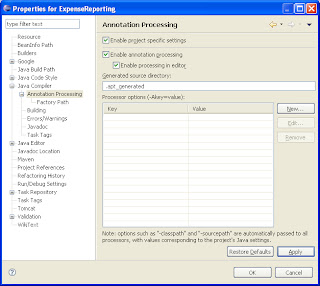

Then do the Maven package, your build will be successful, and the war wil be generated.

Happy Programming...!!!

Friday, March 1, 2013

Different ways of accessing a Zend View Helper

A Zend View Helper is simply a class, which follows a certain convention.When attached to a view object, you can call the helper as if it were a method of the view object itself. The View object retains helper instances,which means that they retain states between calls.
By convention we should use these view helpers in the View Layer only, but there are some circumstances we end up breaking this convention, start using these helpers in Controller, Helpers and Models. Lets see, how we can access the View Helpers from the differnt parts
//In Action Controller, you can access the view helper like below
$this->view->helpername();
or
$this->view->getHelper('helpername');

//In Action Helper, you can access the view helper like below
$view = $this->getActionController()->view;
$view->helpername();

//Suppose if you are in the Model, where you don't have any 
//reference to Zend, this is how you have to access
$viewObject = Zend_Controller_Action_HelperBroker::getStaticHelper('ViewRenderer')->view;
$viewObject->helpername();


Happy Programming ...!!!

Sunday, January 27, 2013

InvalidDataAccessApiUsageException: Write operations are not allowed in read-only mode

If you have enabled the filter OpenSessionInViewFilter, for fetching the lazily loaded data, you can typically see the below error message, when trying to do a persistence operation outside of Spring-managed transaction.

org.springframework.dao.InvalidDataAccessApiUsageException: Write operations are not allowed in read-only mode (FlushMode.NEVER/MANUAL): Turn your Session into FlushMode.COMMIT/AUTO or remove 'readOnly' marker from transaction definition.
org.springframework.orm.hibernate3.HibernateTemplate.checkWriteOperationAllowed(HibernateTemplate.java:1186)
org.springframework.orm.hibernate3.HibernateTemplate$12.doInHibernate(HibernateTemplate.java:696)
org.springframework.orm.hibernate3.HibernateTemplate.doExecute(HibernateTemplate.java:419)
org.springframework.orm.hibernate3.HibernateTemplate.executeWithNativeSession(HibernateTemplate.java:374)
org.springframework.orm.hibernate3.HibernateTemplate.save(HibernateTemplate.java:694)

OpenSessionInViewFilter has an alternative "deferred close mode", to resolve the issue. This can be activated through setting the singleSession=false. This will use one Session per transaction, but keep each of those open until view rendering has been completed. As no Session will be reused for another transaction in this case, there is no risk of accidentally flushing inconsistent state


  OpenSessionInViewFilter
  org.springframework.orm.hibernate3.support.OpenSessionInViewFilter
  
     singleSession     false  


Happy Programming !!!

Saturday, December 22, 2012

Sql Developer - Unable to create instance of java virtual machine

When trying to open SQL Developer IDE, you will get the following exception poped up
unable to create instance of java virtual machine sql developer
SQL Developer is created uisng JAVA, it needs the Java Virtual Machine to run the IDE, sometime the memory allocated to kick start doesn't have enough, then you will see the above exception. To fix, we need to increase the memory allocated to the JVM.

Just AddVMOption -Xmx512M in sqldeveloper\ide\bin\ide.conf. This will resolve the issue.

Happy Programming...!!!

Sunday, December 9, 2012

Hibernate Error : java.lang.NoClassDefFoundError: antlr/ANTLRException

When you are working with the Hibernate Query, you will get the following error
java.lang.NoClassDefFoundError: antlr/ANTLRException
 org.hibernate.hql.ast.ASTQueryTranslatorFactory.createQueryTranslator(ASTQueryTranslatorFactory.java:35)
 org.hibernate.engine.query.HQLQueryPlan.(HQLQueryPlan.java:74)
 org.hibernate.engine.query.HQLQueryPlan.(HQLQueryPlan.java:56)
 org.hibernate.engine.query.QueryPlanCache.getHQLQueryPlan(QueryPlanCache.java:72)
 org.hibernate.impl.AbstractSessionImpl.getHQLQueryPlan(AbstractSessionImpl.java:133)
 org.hibernate.impl.AbstractSessionImpl.createQuery(AbstractSessionImpl.java:112)
 org.hibernate.impl.SessionImpl.createQuery(SessionImpl.java:1623)
All you need is to download the latest version of antlr jar. You can download this from here antlr-2.7.7.jar, and put it under your web lib folder.

Happy Programming...!!!

Saturday, November 24, 2012

Hibernate Error : java.lang.NoClassDefFoundError: org/objectweb/asm/Type

This is the common error we will be getting when working on the Hibernate.
Caused by: java.lang.NoClassDefFoundError: org/objectweb/asm/Type
 at net.sf.cglib.core.TypeUtils.parseType(TypeUtils.java:180)
 at net.sf.cglib.core.KeyFactory.(KeyFactory.java:66)
 at net.sf.cglib.proxy.Enhancer.(Enhancer.java:69)
 at org.hibernate.proxy.pojo.cglib.CGLIBLazyInitializer.getProxyFactory(CGLIBLazyInitializer.java:117)
 at org.hibernate.proxy.pojo.cglib.CGLIBProxyFactory.postInstantiate(CGLIBProxyFactory.java:43)
 at org.hibernate.tuple.entity.PojoEntityTuplizer.buildProxyFactory(PojoEntityTuplizer.java:162)
 at org.hibernate.tuple.entity.AbstractEntityTuplizer.(AbstractEntityTuplizer.java:135)

This was due to the one of the asm jar missing in your /WEB-INF/lib directory. You can download it from their official directory ASM, or you can use the springsource object jar, which can be downloaded here

Happy Programming !!!

Thursday, October 18, 2012

How to get a FaceBook comment count for a page?

Face open graph api has relevant info, to send you the facebook comment count for a particular page. Below is the sample code, which will return you the JSON response of the page details, from where you can fetch comments count, you just need to pass the URL.

Note: Your page URL is the unique identifier.

$json = json_decode(file_get_contents('https://graph.facebook.com/?ids=' . $url));
return ($json->$url->comments) ? $json->$url->comments : 0;